Test
Documentation of the demonstration cases located in test.
Transfinite Mesh interTransMesh
Create a simple geometry by an intersection of two curves and mesh a four sided face with quadrangles.
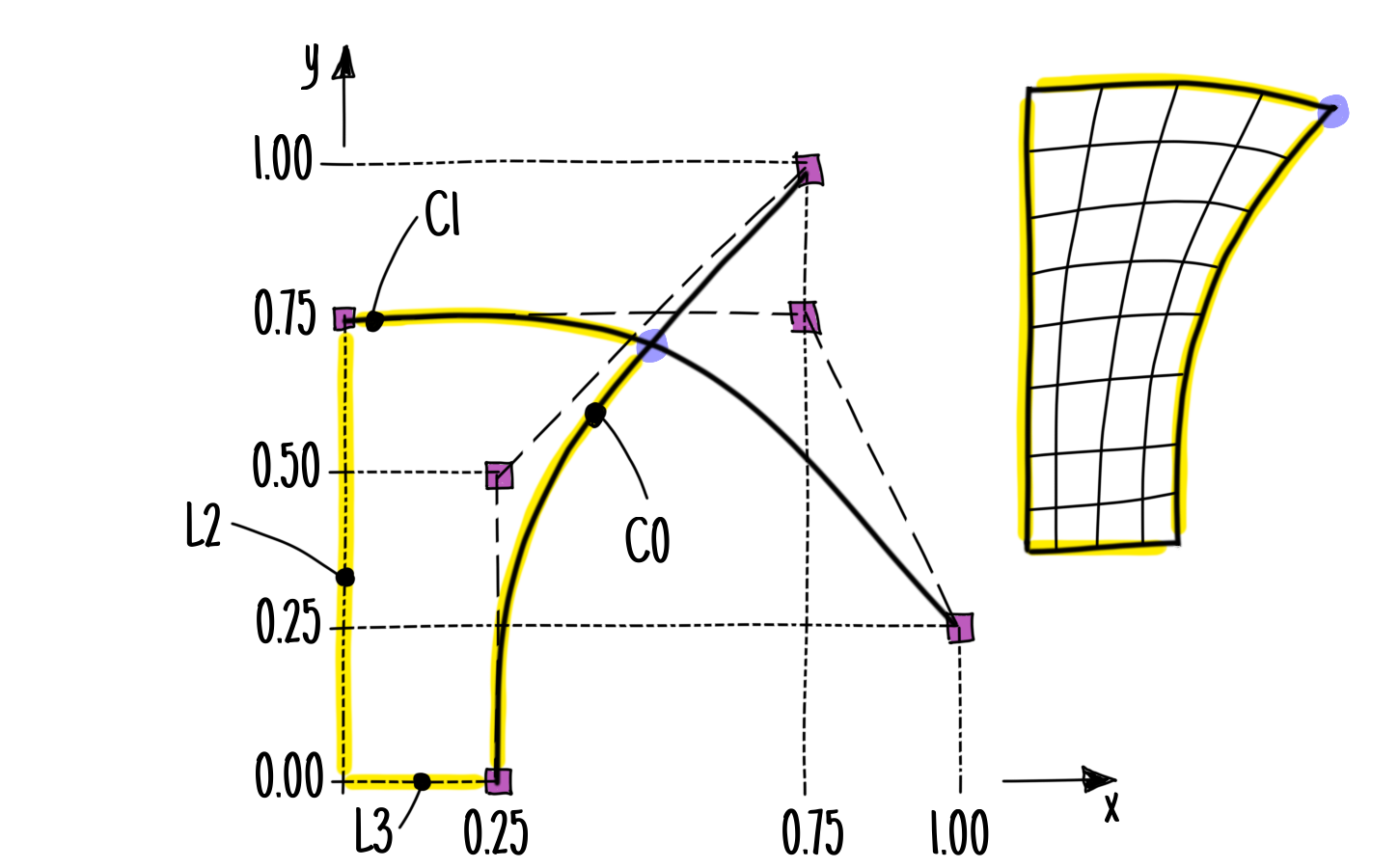
Fig. 36 Sketch of geometry and mesh including control points (magenta colored), B-Splines (black thick solid), intersection point (magenta colored), and mesh face’s boundaries (yellow colored); transfinite mesh shown on the right hand side
Import dtOO:
>>> import dtOOPythonSWIG as dtOO
Create a log file:
>>> dtOO.logMe.initLog('interTransMesh.log')
'interTransMesh.log'
Define dtOO’s options:
>>> dtOO.staticPropertiesHandler.getInstance().jInit(
...   dtOO.jsonPrimitive(
...     '{'
...       '"option" : ['
...         '{"name" : "invY_precision", "value" : "1.e-04"},'
...         '{"name" : "xyz_resolution", "value" : "1.e-05"},'
...         '{"name" : "uvw_resolution", "value" : "1.e-04"},'
...         '{"name" : "function_render_resolution_u", "value" : "21"},'
...         '{"name" : "function_render_resolution_v", "value" : "21"},'
...         '{"name" : "function_render_resolution_w", "value" : "21"},'
...         '{"name" : "geometry_render_resolution_u", "value" : "21"},'
...         '{"name" : "geometry_render_resolution_v", "value" : "21"},'
...         '{"name" : "geometry_render_resolution_w", "value" : "21"},'
...         '{"name" : "logLevel", "value" : "error"},'
...         '{"name" : "isEqualExtendCheck", "value" : "false"}'
...       ']'
...     '}'
...   )
... )
Create a dtBundle object; this is necessary for the definition of a
labeledVectorHandlingConstValue object that is observed by a
dtOO.lVHOstateHandler.clear:
>>> container = dtOO.dtBundle()
>>> cV = container.cptr_cV()
>>> dtOO.lVHOstateHandler.clear()
>>> dtOO.lVHOstateHandler( dtOO.jsonPrimitive(), cV).thisown = False
Create a B-Spline curve with three control points and of second order; the
__lshift__- or <<-operator appends the points to the
vectorDtPoint3 object:
>>> C0 = dtOO.bSplineCurve_pointConstructOCC(
...   dtOO.vectorDtPoint3()
...     << dtOO.dtPoint3(0.25,0.00,0.00)
...     << dtOO.dtPoint3(0.25,0.50,0.00)
...     << dtOO.dtPoint3(0.75,1.00,0.00),
...   2
... ).result()
Create a second B-Spline curve:
>>> C1 = dtOO.bSplineCurve_pointConstructOCC(
...   dtOO.vectorDtPoint3()
...     << dtOO.dtPoint3(0.00,0.75,0.00)
...     << dtOO.dtPoint3(0.75,0.75,0.00)
...     << dtOO.dtPoint3(1.00,0.25,0.00),
...   2
... ).result()
Create a minimization object to find the intersection point of two curves; the
object is created with a subclass of floatAtt; different choices are
implemented in attributionHeaven;
the class curveCurveDist calculates the distance of two points that are
on two different curves:
>>> gmf = dtOO.gslMinFloatAttr(
...   dtOO.curveCurveDist(C0,C1),
...   dtOO.vectorReal([0.5, 0.5,]),
...   dtOO.vectorReal([0.001, 0.001,]),
...   1.e-8,
...   100
... )
Perform the minimization; the result is stored in an internal vector that can
be accessed via the result() function:
>>> gmf.perform()
True
Create the B-Spline surface; the builder
bSplineSurface_bSplineCurveFillConstructOCC takes four curves as input
and constructs a B-Spline surface; the boundary curves are constructed as
straight line (L3 and L2 in Fig. 36) or trimmed curve
(pieces of C0 and C1 in Fig. 36):
>>> S0 = dtOO.bSplineSurface_bSplineCurveFillConstructOCC(
...   dtOO.bSplineCurve_pointConstructOCC(
...     dtOO.dtPoint3(0,0,0), C0.pointPercent(0.0)
...   ).result(),
...   dtOO.trimmedCurve_uBounds(
...     C0, 0.0, C0.u_uPercent(gmf.result()[0])
...   ).result(),
...   dtOO.trimmedCurve_uBounds(
...     C1, 0.0, C1.u_uPercent(gmf.result()[1])
...   ).result(),
...   dtOO.bSplineCurve_pointConstructOCC(
...     dtOO.dtPoint3(0,0,0), C1.pointPercent(0.0)
...   ).result()
... ).result()
Create an analyticSurface:
>>> aS0 = dtOO.analyticSurface(S0)
Create a gmshBoundedVolume for meshing:
>>> gBV = dtOO.gmshBoundedVolume()
Initialize the boundedVolume:
>>> gBV.jInit(
...   dtOO.jsonPrimitive(
...   '{'
...     '"label" : "interTransMesh", '
...     '"option" : ['
...       '{"name":"[gmsh]General.Terminal", "value":"1."},'
...       '{"name":"[gmsh]General.Verbosity", "value":"0"},'
...       '{"name":"[gmsh]General.ExpertMode", "value":"1."},'
...       '{"name":"[gmsh]Mesh.LcIntegrationPrecision", "value":"1.0E-04"},'
...       '{"name":"[gmsh]Mesh.CharacteristicLengthMin", "value":"0.1"},'
...       '{"name":"[gmsh]Mesh.CharacteristicLengthMax", "value":"0.5"},'
...       '{"name":"[gmsh]Mesh.Algorithm", "value":"1"},'
...       '{"name":"[gmsh]Mesh.MeshSizeExtendFromBoundary", "value":"1"},'
...       '{"name":"[gmsh]Mesh.MeshSizeFromPoints", "value":"1"}'
...     '],'
...     '"analyticGeometry" : []'
...   '}'
...   ),
...   None, None, None, None, None
... )
Store the underlying gmsh model in gm:
>>> gm = gBV.getModel()
Add the analyticSurface and tag the face with a string:
>>> gm.tagPhysical(
...   gm.getDtGmshFaceByTag(gm.addIfFaceToGmshModel( aS0 )), "theFace"
... )
Define the B-Spline surface as transfinite face and recombine the triangles:
>>> gm.getDtGmshFaceByPhysical("theFace").meshTransfinite()
>>> gm.getDtGmshFaceByPhysical("theFace").meshRecombine()
Define all boundary curves of the face as transfinite faces and define an uniform point distribution:
>>> gm.getDtGmshEdgeByPhysical("theFace->0").meshTransfinite(1,1)
>>> gm.getDtGmshEdgeByPhysical("theFace->1").meshTransfinite(1,1)
>>> gm.getDtGmshEdgeByPhysical("theFace->2").meshTransfinite(1,1)
>>> gm.getDtGmshEdgeByPhysical("theFace->3").meshTransfinite(1,1)
Set the number of elements on the boundary edges:
>>> gm.getDtGmshEdgeByPhysical("theFace->0").setNElements(5)
>>> gm.getDtGmshEdgeByPhysical("theFace->1").setNElements(10)
>>> gm.getDtGmshEdgeByPhysical("theFace->2").setNElements(5)
>>> gm.getDtGmshEdgeByPhysical("theFace->3").setNElements(10)
Define and initialize a mesh rule with mesh operators:
>>> ob = dtOO.bVOMeshRule()
>>> ob.jInit(
...   dtOO.jsonPrimitive(
...     '{'
...       '"_rule1D" : ["dtMeshGEdge(theFace->*)"],'
...       '"_rule2D" : ["dtMeshGFace(theFace)"],'
...       '"_rule3D" : [],'
...       '"_only" : [],'
...       '"dtMeshOperator" : ['
...         '{"name" : "dtMeshGEdge","label" : "dtMeshGEdge"},'
...         '{"name" : "dtMeshGFace", "label" : "dtMeshGFace"}'
...       ']'
...     '}'
...   ),
...   None, None, None, None, None, gBV
... )
Attach the observer to the gmshBoundedVolume; set thisown flag to
prevent segmentation fault:
>>> gBV.attachBVObserver(ob)
>>> ob.thisown = False
Create the mesh:
>>> gBV.makeGrid()
Create and initialize an observer to write the mesh to a msh file:
>>> ob = dtOO.bVOWriteMSH()
>>> ob.jInit(
...   dtOO.jsonPrimitive(
...     '{"_filename" : "interTransMesh.msh", "_saveAll" : true}'
...   ),
...   gBV
... )
Apply the observer to write the mesh:
>>> ob.postUpdate()
Minimization floatAtt
Import
>>> from dtOOPythonSWIG import *
Initialize a log file:
>>> logMe.initLog("floatAtt.log")
'floatAtt.log'
Create staticPropertiesHandler and initialize:
>>> staticPropertiesHandler.getInstance().jInit(
...   jsonPrimitive(
...     '{'
...       '"option" : ['
...         '{"name" : "invY_precision", "value" : "1.e-04"},'
...         '{"name" : "xyz_resolution", "value" : "1.e-08"},'
...         '{"name" : "uvw_resolution", "value" : "1.e-04"},'
...         '{"name" : "logLevel", "value" : "trace"}'
...       ']'
...     '}'
...   )
... )
Create the function
as a vec3dMuParserTwoD-object:
>>> ff = vec3dMuParserTwoD("u,v,u*u+v*v","u","v")
Set the ranges for \(u\) and \(v\):
>>> for i in [0,1,]:
...   ff.setMin(i,-100.0)
...   ff.setMax(i,+100.0)
Create the infinite space \(im\) as parameter space for the function \(ff\):
>>> im = infinityMap3dTo3d()
Define an analyticGeometry as a composition of \(ff\) and \(im\):
>>> mm = vec3dTwoDInMap3dTo3d(ff,im)
Define the point \(p0\) that should be reparameterized:
>>> p0 = dtPoint3(0,0,0)
Define a pointGeometryDist object that provides the connection between the
analyticGeometry \(mm\) and the point \(p0\); pointGeometryDist
is a strategy for ``floatAtt`:
>>> att = pointGeometryDist(p0, mm)
Minimize the distance between geometry and point using a gradient-based minimization technique; the attributes of the minimizer are the strategy, the initial guess, the step size, the desired precision, and the maximum number of iterations:
>>> gradMin = gslGradMinFloatAttr(
...   att,
...   [0.01,.99],
...   [0.001,0.001],
...   1.e-8,
...   100
... )
Convergence check:
>>> gradMin.perform()
True
Minimize the distance using a gradient-free minimization technique:
>>> min = gslMinFloatAttr(
...   att,
...   [0.01,.99],
...   [0.001,0.001],
...   1.e-8,
...   100
... )
Convergence check:
>>> min.perform()
True
Simple Axial Runner simpleAxialRunner
Create a very simple machine that consists only of an axial runner. First an object is created by:
>>> machine = simpleAxialRunner()
The channel is created by two splines each containing two control points. Within the channel a mean plane is defined and a thickness distribution is added. The machine is created by:
>>> bundle = machine.create(alpha_2_1=40.0)
This results in a machine with an outlet angle at the shroud of 40 degree.
>>> from dtOOPythonApp.tools import dtOO2OCC
>>> dtOO2OCC.WriteSTEP(
...   dtOO2OCC.TopoDS(
...     [
...       dtOO2OCC.analyticSurface_analyticGeometry(
...         bundle.cptr_aG()["xyz_blade"]
...       ).approx(uInts=np.linspace(0.0, 1.0, 501)),
...       dtOO2OCC.analyticSurface_analyticGeometry(
...         dtOO.map3dTo3d.ConstDownCast(
...           bundle.cptr_aG()["xyz_gridChannel"]
...         ).segmentConstUPercent(0.0)
...       ).approx(),
...       dtOO2OCC.analyticSurface_analyticGeometry(
...         dtOO.map3dTo3d.ConstDownCast(
...           bundle.cptr_aG()["xyz_gridChannel"]
...         ).segmentConstUPercent(1.0)
...       ).approx(),
...       dtOO2OCC.analyticSurface_analyticGeometry(
...         dtOO.map3dTo3d.ConstDownCast(
...           bundle.cptr_aG()["xyz_gridChannel"]
...         ).segmentConstVPercent(0.0)
...       ).approx(),
...       dtOO2OCC.analyticSurface_analyticGeometry(
...         dtOO.map3dTo3d.ConstDownCast(
...           bundle.cptr_aG()["xyz_gridChannel"]
...         ).segmentConstVPercent(1.0)
...       ).approx(),
...       dtOO2OCC.analyticSurface_analyticGeometry(
...         dtOO.map3dTo3d.ConstDownCast(
...           bundle.cptr_aG()["xyz_gridChannel"]
...         ).segmentConstWPercent(0.0)
...       ).approx(),
...       dtOO2OCC.analyticSurface_analyticGeometry(
...         dtOO.map3dTo3d.ConstDownCast(
...           bundle.cptr_aG()["xyz_gridChannel"]
...         ).segmentConstWPercent(1.0)
...       ).approx(),
...     ]
...   ),
...   "simpleAxialRunner.stp"
... )
The OpenFOAMCase is created by:
>>> bundle.cptr_dC()["of"].runCurrentState()
The current case is then written to a directory:
>>> cDir = bundle.cptr_dC()["of"].getDirectory(
...   dtOO.lVHOstateHandler().commonState()
... )
The foamlib package is used to modify the dicts.
>>> import foamlib
Initialize foamlib object
>>> fc = foamlib.FoamCase( cDir )
Before running the simulation the writeInterval and endTime is adjusted by:
>>> fc.control_dict['writeInterval'] = 25
>>> fc.control_dict['endTime'] = 50
Additionally, the flow is treated as laminar:
>>> fc.turbulence_properties["RAS"]["turbulence"] = False
The foamlib package is used to start the simulation:
>>> fc.run()
(of_...
- CreateAndShow(*args, **kwargs)[source]
Create and show machine.
- Parameters:
None
- Returns:
List[ dtOO.dtBundle, dtOOInParaVIEW ] – List containing the dtBundle and the render object for ParaVIEW.
See Also
———
simpleAxialRunner.create (Create machine.)
- class simpleAxialRunner[source]
Simple machine consisting of an axial runner only.
- Parameters:
None
- create(alpha_1_0: float = 90.0, alpha_1_1: float = 90.0, alpha_2_0: float = 80.0, alpha_2_1: float = 80.0) dtOOPythonSWIG.dtBundle[source]
Create machine.
The machine is created and dtOO’s logfile is created as build.log.
- Parameters:
alpha_1_0 (float, default = 90.0) – Inlet angle at hub.
alpha_1_1 (float, default = 90.0) – Inlet angle at shroud.
alpha_2_0 (float, default = 80.0) – Outlet angle at hub.
alpha_2_1 (float, default = 80.0) – Outlet angle at shroud.
- Returns:
Container that contains machine’s parts.
- Return type:
dtContainer
Cuboid Mesh meshCuboid
Create a cuboid by translating and skinning a base surface. Generate a mesh of the geometry with a grading on a single edge.
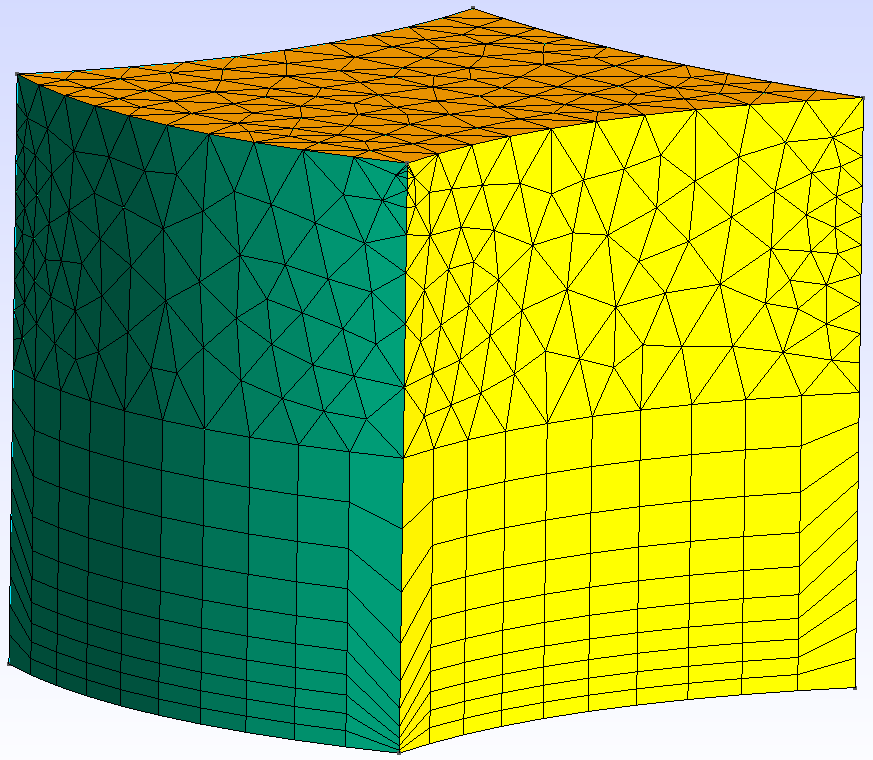
Fig. 37 The final mesh generated in this test; visible are the surfaces “top” (orange), “skin_1” (yellow) and “skin_5” (green); graded edge is located between the green and yellow surface; “base” surface is the opposite surface of “top”
Import dtOO and numpy:
>>> import dtOOPythonSWIG as dtOO
>>> import numpy as np
Create a log file:
>>> dtOO.logMe.initLog('gradingCuboid.log')
'gradingCuboid.log'
Define dtOO’s options:
>>> dtOO.staticPropertiesHandler.getInstance().jInit(
...   dtOO.jsonPrimitive(
...     '{'
...       '"option" : ['
...         '{"name" : "invY_precision", "value" : "1.e-04"},'
...         '{"name" : "xyz_resolution", "value" : "1.e-05"},'
...         '{"name" : "uvw_resolution", "value" : "1.e-04"},'
...         '{"name" : "function_render_resolution_u", "value" : "21"},'
...         '{"name" : "function_render_resolution_v", "value" : "21"},'
...         '{"name" : "function_render_resolution_w", "value" : "21"},'
...         '{"name" : "geometry_render_resolution_u", "value" : "21"},'
...         '{"name" : "geometry_render_resolution_v", "value" : "21"},'
...         '{"name" : "geometry_render_resolution_w", "value" : "21"},'
...         '{"name" : "logLevel", "value" : "error"},'
...         '{"name" : "isEqualExtendCheck", "value" : "false"}'
...       ']'
...     '}'
...   )
... )
Create containers for object handling:
>>> container = dtOO.dtBundle()
>>> cV = container.cptr_cV()
>>> dtOO.lVHOstateHandler.clear()
>>> dtOO.lVHOstateHandler( dtOO.jsonPrimitive(), cV ).thisown = False
>>> aF = container.cptr_aF()
>>> aG = container.cptr_aG()
>>> bV = container.cptr_bV()
>>> dP = container.cptr_dP()
Create an array for the corners of the base surface:
>>> p0 = dtOO.dtPoint3(0.0, 0.0, 0.0)
>>> p1 = dtOO.dtPoint3(1.0, 0.0, 0.0)
>>> p2 = dtOO.dtPoint3(1.0, 0.0, 1.0)
>>> p3 = dtOO.dtPoint3(0.0, 0.0, 1.0)
>>> p01 = dtOO.dtPoint3(0.5, 0.0, 0.2)
>>> p12 = dtOO.dtPoint3(0.9, 0.0, 0.5)
>>> p23 = dtOO.dtPoint3(0.5, 0.0, 0.8)
>>> p30 = dtOO.dtPoint3(-0.2, 0.0, 0.5)
Create 4 B-Splines connecting the corners and the intermediate points:
>>> curve01 = dtOO.bSplineCurve_pointConstructOCC(
...   dtOO.vectorDtPoint3() << p0 << p01 << p1, 2
... ).result()
>>> curve12 = dtOO.bSplineCurve_pointConstructOCC(
...   dtOO.vectorDtPoint3() << p1 << p12 << p2, 2
... ).result()
>>> curve23 = dtOO.bSplineCurve_pointConstructOCC(
...   dtOO.vectorDtPoint3() << p2 << p23 << p3, 2
... ).result()
>>> curve30 = dtOO.bSplineCurve_pointConstructOCC(
...   dtOO.vectorDtPoint3() << p3 << p30 << p0, 2
... ).result()
Create the base surface as a B-Spline surface from the four curves:
>>> surf0 = dtOO.bSplineSurface_bSplineCurveFillConstructOCC(
...   curve01, curve12, curve23, curve30,
... ).result()
Create an analytic surface and label it with the string “base”:
>>> base = dtOO.analyticSurface(surf0)
>>> base.setLabel("base")
Deposit a clone of the surface in aG:
>>> aG.push_back( base.clone() )
Create the top surface by translating the base surface.
The command geomSurface_surfaceTranslateConstructOCC takes a surface and
a translation vector as input:
>>> surf1 = dtOO.geomSurface_surfaceTranslateConstructOCC(
...   base.ptrConstDtSurface(), dtOO.dtVector3(0,1,0)
... ).result()
Create an analytic surface, label it with the string “top” and deposit it in
aG:
>>> top = dtOO.analyticSurface(surf1)
>>> top.setLabel("top")
>>> aG.push_back( top.clone() )
Create a vector and fill it with the handles of the “base” and “top” surfaces:
>>> vhs = dtOO.vectorHandlingConstDtSurface()
>>> vhs.push_back( base.ptrConstDtSurface() )
>>> vhs.push_back( top.ptrConstDtSurface() )
Create surfaces of the cuboid by skinning the base and the top surface.
The builder bSplineSurfaces_bSplineSurfaceSkinConstructOCC takes the
vector vhs as input:
>>> vh = dtOO.bSplineSurfaces_bSplineSurfaceSkinConstructOCC(vhs).result()
Iterate over the skinned surfaces in order to create analytic surfaces. Label
and deposit them in the aG container.
The skinned surfaces are labeled with the string skin_ plus their iterator:
>>> p = 0
>>> for i in vh:
...   aa = dtOO.analyticSurface( i )
...   aa.setLabel("skin_"+str(p))
...   aG.push_back( aa.clone() )
...   p = p + 1
Create and initialize the volume for meshing:
>>> ref = dtOO.map3dTo3dGmsh()
>>> ref.thisown = False
>>> ref.jInit(
...   dtOO.jsonPrimitive(
...     '{"label" : "meshCuboid",'
...         '"option" : ['
...         '{"name" : "[gmsh]General.Terminal", "value" : "1."},'
...         '{"name" : "[gmsh]General.Verbosity", "value" : "100."},'
...         '{"name" : "[gmsh]General.ExpertMode", "value" : "1."},'
...         '{"name" : "[gmsh]Mesh.CharacteristicLengthMin", "value" : "0.05"},'
...         '{"name" : "[gmsh]Mesh.CharacteristicLengthMax", "value" : "0.1"},'
...         '{"name" : "[gmsh]Mesh.Algorithm", "value" : "1"},'
...         '{"name" : "[gmsh]Mesh.MeshSizeExtendFromBoundary", "value" : "1"},'
...         '{"name" : "[gmsh]Mesh.MeshSizeFromPoints", "value" : "1"}'
...       '],'
...       '"analyticGeometry" : []'
...     '}'),
...     None, None, None, None, None
... )
Add the analytic geometries to the Gmsh model.
Iterate over all analytic geometries and add them to the model with
addIfFaceToGmshModel.
The sucessfully added geometries are saved in the vector fid:
>>> fid = dtOO.vectorInt()
>>> for a_i in aG:
...   tid = ref.getModel().addIfFaceToGmshModel(
...     dtOO.map2dTo3d.MustConstDownCast( a_i )
...   )
...   if tid!=0:
...     fid.push_back(tid)
Add a volume to the Gmsh model with addIfRegionToGmshModel.
The volume is defined by the geometries in vector fid:
>>> ref.getModel().addIfRegionToGmshModel(dtOO.infinityMap3dTo3d(), fid)
1
Define and initialize the mesh boundaries by handing the surface labels to
gmsh.
“skin_0” and “skin_2” are the same geometries as “base” and “top” and are not
handed over.
The specifier _facesPerEntry defines how many faces each geometry has.
According to the number of faces a indice is added (for example: “base_0” for
the first face of “base”).:
>>> ob = dtOO.bVOAnalyticGeometryToFace()
>>> ob.jInit(
...   dtOO.jsonPrimitive(
...     '{'
...       '"analyticGeometry" : ['
...         '{"label" : "base"},'
...         '{"label" : "top"},'
...         '{"label" : "skin_1"},'
...         '{"label" : "skin_3"},'
...         '{"label" : "skin_4"},'
...         '{"label" : "skin_5"}'
...       '],'
...       '"_inc" : 10.0,'
...       '"_facesPerEntry" : [1,1,1,1,1,1]'
...     '}'
...   ),
...   None, None, None, aG, None, ref
... )
>>> ob.preUpdate()
Set the number of elements to 10 on all edges by iterating over them:
>>> for e in ref.getModel().dtEdges():
...   e.meshTransfiniteWNElements(1,1,10)
Set the number of elments to 20 on the edges connecting the top and the bottom
surface.
The method getDtGmshEdgeTagListByFromToPhysical takes two surfaces and
returns the tag list of the edges between them.
By iterating through the tag list the number of elements is set on each edge.
Set the surface meshes on the sides to transfinite:
>>> eID = ref.getModel().getDtGmshEdgeTagListByFromToPhysical("base*","top*")
>>> for e in eID:
...   theEdge = ref.getModel().getDtGmshEdgeByTag(e)
...   theEdge.meshTransfiniteWNElements(1,1.0,20)
...   for f in theEdge.dtFaces():
...     f.meshTransfinite()
Make the “base” surface transfinite with meshTransfinite and recombine
it with meshRecombine.
This will generate hex elements in the transfinite layer.
>>> ref.getModel().getDtGmshFaceByPhysical("base_0").meshTransfinite()
>>> ref.getModel().getDtGmshFaceByPhysical("base_0").meshRecombine()
Set a grading on the edge between “skin_1” and “skin_5”. The Edge is found
by comparing the tags of the edges of both surfaces.
The common edge of both surfaces will have the same absolute value of the tag.
The grading is set with the command setGrading the second entry in this
command is an identifier:
>>> edges_1 = ref.getModel().getDtGmshFaceByPhysical("skin_1_0").dtEdges()
>>> edges_2 = ref.getModel().getDtGmshFaceByPhysical("skin_5_0").dtEdges()
>>> for e1 in edges_1:
...   for e2 in edges_2:
...     if np.abs(e1.tag()) == np.abs(e2.tag()):
...       e1.setGrading(1.0, 3)
Define the grading function. The method
scaTanhGradingOneD(c, g, gMin, gMax) builds a tanh-function.
The function is defined by the following formula:
>>> gradingFun = dtOO.scaTanhGradingOneDCompound(
...   dtOO.scaTanhGradingOneD(
...     dtOO.vectorReal([0.5, 0.5, -1.0, 2.0]), 1.0, 1.0, 5.0
...   )
... )
Label the grading function and push it into aF:
>>> gradingFun.setLabel( "aF_grading" )
>>> aF.push_back( gradingFun.clone() )
Define the grading. The _type is the identifier specified in
setGrading.
_firstElementSize sets the size of the first element in the grading. The
grading function is specified with _grading:
>>> ob = dtOO.bVOSetPrescribedElementSize()
>>> ob.thisown = False
>>> ob.jInit(
...   dtOO.jsonPrimitive(
...     '{'
...       '"_type": 3,'
...       '"_firstElementSize": 0.005,'
...       '"_grading" : { "analyticFunction" : {"label" : "aF_grading"} }'
...     '}'
...   ),
...   None, None, aF, None, None, ref
... )
>>> ref.attachBVObserver(ob)
Define the mesh rules. The following rules are set:
dtMeshFreeGradingGEdge:Connects the specified grading numbers and functions.
typeTransfinitecontains an array of all the grading identifiers
gradingFunctionscontains an array with all the analytic functions of the gradingsdtMeshGFace:Creates the mesh of the “base” and the “top” surfaces.
dtMeshGFaceWithTransfiniteLayer:Creates the mesh of the other surfaces with transfinite layers.
_nLayersspecifies the number of layers on the opposing ends of the face.
_directionspecifies the direction of the layers (parametric u or v).
_nSmoothspecifies the number of smoothing iterations.dtMeshGRegionWithBoundaryLayer:Creates the mesh of the volume between the surfaces.
_nSpacingStepsspecifies the layers in the Volume. The magnitde has to be (_nLayers-1). Additionally, the normals on this surface are flipped, if the number is negative.
_faceLabelspecifies the face where the layers are.
_slidableFaceLabelspecifies the faces where the mesh is built adaptively.
dtMesh3DOperatorspecifies the mesh operator used for the transition of the layers to the tetraedral mesh.
_fixedFaceLabelspecifies the face on the opposite side to_faceLabel.dtMeshGRegion:Creates the volume mesh, specifically handles the pyramid elements between the hex-layer and the tet-elements.
>>> ob = dtOO.bVOMeshRule()
>>> ob.thisown = False
>>> ob.jInit(
...   dtOO.jsonPrimitive(
...     '{'
...       '"option" : ['
...         '{"name" : "debug", "value" : "true"}'
...       '],'
...       '"_rule1D" : ['
...         '"dtMeshFreeGradingGEdge(*)"'
...       '],'
...       '"_rule2D" : ['
...         '"dtMeshGFace(base_0)",'
...         '"dtMeshGFace(top_0)",'
...         '"dtMeshGFaceWithTransfiniteLayer(*)"'
...       '],'
...       '"_rule3D" : ['
...         '"dtMeshGRegionWithBoundaryLayer(*)"'
...       '],'
...       '"_only" : [],'
...       '"dtMeshOperator" : ['
...         '{'
...           '"name" : "dtMeshFreeGradingGEdge",'
...           '"label" : "dtMeshFreeGradingGEdge",'
...           '"typeTransfinite" : [3],'
...           '"gradingFunctions" : { "analyticFunction" : ['
...             '{"label" : "aF_grading"}'
...           ']}'
...         '},'
...         '{'
...           '"name" : "dtMeshGFace",'
...           '"label" : "dtMeshGFace"'
...         '},'
...         '{'
...           '"name" : "dtMeshGFaceWithTransfiniteLayer",'
...           '"label" : "dtMeshGFaceWithTransfiniteLayer",'
...           '"_nLayers" : [ 10, 0],'
...           '"_direction" : 0,'
...           '"_nSmooth" : 0'
...         '},'
...         '{'
...           '"name" : "dtMeshGRegion",'
...           '"label" : "dtMeshGRegion",'
...           '"_minQShapeMetric" : 0.0,'
...           '"_relax" : 0.1,'
...           '"_nPyramidOpenSteps" : 10,'
...           '"_nSmooths" : 3'
...         '},'
...         '{'
...           '"option" : ['
...             '{"name" : "debug", "value" : "true"}'
...           '],'
...           '"name" : "dtMeshGRegionWithBoundaryLayer",'
...           '"label" : "dtMeshGRegionWithBoundaryLayer",'
...           '"_nSpacingSteps" : [-9],'
...           '"_nNormalSmoothingSteps" : 100,'
...           '"_nGrowingSmoothingSteps" : 100,'
...           '"_maxGrowingRatePerStep" : 2,'
...           '"_maxDihedralAngle" : '+str(float(np.pi*360./180.))+','
...           '"_faceLabel" : ["base_0"],"'
...           '_slidableFaceLabel" : ["*skin_*"],'
...           '"dtMesh3DOperator" : "dtMeshGRegion",'
...           '"_fixedFaceLabel" : ["top_0"]'
...         '}'
...       ']'
...     '}'
...   ),
...   None, None, aF, None, None, ref
... )
>>> ref.attachBVObserver(ob)
Add the Gmsh mapping to bV and create the mesh:
>>> bV.set( ref )
>>> bV[0].makeGrid()
Create and initialize an observer to wite the mesh file:
>>> ob = dtOO.bVOWriteMSH()
>>> ob.jInit(
...   dtOO.jsonPrimitive(
...     '{"_filename" : "", "_saveAll" : true}'
...   ),
...   None, None, None, None, None, ref
... )
>>> ob.postUpdate()
Clear the vector handling object:
>>> dtOO.lVHOstateHandler.clear()
Multiple bounded surfaces and volumes multipleBounded
Import dtOOPythonSWIG:
>>> from dtOOPythonSWIG import *
Create a log file:
>>> logMe.initLog('multipleBounded.log')
'multipleBounded.log'
Create a staticPropertiesHandler object and initialize:
>>> staticPropertiesHandler.getInstance().jInit(jsonPrimitive())
Create a container, a vector of constValue objects and initialize a
lVHOstateHandler object:
>>> container = dtBundle()
>>> cV = container.cptr_cV()
>>> lVHOstateHandler.clear()
>>> lVHOstateHandler( jsonPrimitive(), cV ).thisown = False
Function that creates edges and faces at z-position zz; the face is
rectangular with the vertices P0, P1, P2 and P3; the face is
stored in the variable m2d; the five edges lie inside of this face, but
are _not_ parameterized in the face; the vector `m1ds contains all
edges:
>>> def CreateFaceAtZ( zz ):
...   P0 = dtPoint3(-0.5,-0.5,zz)
...   P1 = dtPoint3(+1.5,-0.5,zz)
...   P2 = dtPoint3(+1.5,+1.5,zz)
...   P3 = dtPoint3(-0.5,+1.5,zz)
...
...   m2d = analyticSurface(
...     bSplineSurface_bSplineCurveFillConstructOCC(
...       bSplineCurve_pointConstructOCC(P0, P1).result(),
...       bSplineCurve_pointConstructOCC(P1, P2).result(),
...       bSplineCurve_pointConstructOCC(P2, P3).result(),
...       bSplineCurve_pointConstructOCC(P3, P0).result()
...     ).result()
...   )
...
...   p0 = dtPoint3(0.0,0.0,zz)
...   p1 = dtPoint3(1.0,0.0,zz)
...   p2 = dtPoint3(1.0,0.5,zz)
...   p3 = dtPoint3(0.5,1.0,zz)
...   p4 = dtPoint3(0.0,1.0,zz)
...
...   bc0 = bSplineCurve_pointConstructOCC(p0, p1).result()
...   bc1 = bSplineCurve_pointConstructOCC(p1, p2).result()
...   bc2 = bSplineCurve_pointConstructOCC(p2, p3).result()
...   bc3 = bSplineCurve_pointConstructOCC(p3, p4).result()
...   bc4 = bSplineCurve_pointConstructOCC(p4, p0).result()
...
...   m1ds = vectorHandlingAnalyticGeometry()
...   m1ds.push_back(analyticCurve(bc0).clone())
...   m1ds.push_back(analyticCurve(bc1).clone())
...   m1ds.push_back(analyticCurve(bc2).clone())
...   m1ds.push_back(analyticCurve(bc3).clone())
...   m1ds.push_back(analyticCurve(bc4).clone())
...
...   return m1ds, m2d
Call the function twice at two different positions of zz:
>>> m1ds0, m2d0 = CreateFaceAtZ(0.0)
>>> m1ds1, m2d1 = CreateFaceAtZ(1.0)
Create an empty vector of analyticGeometry objects:
>>> m2ds = container.cptr_aG()
Create two objects of multipleBoundedSurface; the surfaces are bounded by
five edges; the first argument holds the surface information; it is important
to keep in mind, that the edge and face is not coupled outside of the
multipleBoundedSurface-object; the <<-operator clones the object and
sets a new label:
>>> m2ds.push_back( multipleBoundedSurface(m2d0, m1ds0) << "mBS_0" )
>>> m2ds.push_back( multipleBoundedSurface(m2d1, m1ds1) << "mBS_1" )
Loop through all edges of a face and create a skin surface with the two edges; these faces are the side faces of the whole volume:
>>> ii = 0
>>> for m1d in m1ds0:
...     m2ds.push_back(
...       analyticSurface(
...         bSplineSurface_skinConstructOCC(
...           analyticCurve.ConstSecureCast(m1ds0[ii]).ptrDtCurve(),
...           analyticCurve.ConstSecureCast(m1ds1[ii]).ptrDtCurve()
...         ).result()
...       ).clone()
...     )
...     ii = ii+1
Create the multipleBoundedVolume object with all bounding faces and an
infinityMap3dTo3d; the map is a dummy object that servers as a function
inside of the volume; this function is not used in gmsh:
>>> mv = multipleBoundedVolume(infinityMap3dTo3d(), m2ds)
Create a meshable region, set some options and initialize:
>>> ref = map3dTo3dGmsh()
>>> ref.thisown = False
>>> ref.jInit(
...   jsonPrimitive(
...     '{"label" : "multipleBounded",'
...         '"option" : ['
...         '{"name" : "[gmsh]General.Terminal", "value" : "1."},'
...         '{"name" : "[gmsh]General.Verbosity", "value" : "100."},'
...         '{"name" : "[gmsh]General.ExpertMode", "value" : "1."},'
...         '{"name" : "[gmsh]Mesh.CharacteristicLengthMin", "value" : "0.05"},'
...         '{"name" : "[gmsh]Mesh.CharacteristicLengthMax", "value" : "0.1"},'
...         '{"name" : "[gmsh]Mesh.Algorithm", "value" : "1"},'
...         '{"name" : "[gmsh]Mesh.MeshSizeExtendFromBoundary", "value" : "1"},'
...         '{"name" : "[gmsh]Mesh.MeshSizeFromPoints", "value" : "1"}'
...       '],'
...       '"analyticGeometry" : []'
...     '}'),
...     None, None, None, None, None
... )
Get the model and add the multipleBoundedVolume object to it:
>>> gm = ref.getModel()
>>> mv_id = gm.addIfToGmshModel(mv)
Store the region in the variable theRegion:
>>> theRegion = gm.getDtGmshRegionByTag(mv_id)
Set a physical tag to the region:
>>> gm.tagPhysical( theRegion, "mbv" )
#for aFace in gm.getDtGmshRegionByPhysical(“mbv”).dtFaces():
Iterate over all faces of the region and tag all faces with an ascending
number; the dtGmshModel’s function getDtGmshFaceListByPhysical
searches for physical tags and returns a list; the operator -> in the
input string argument separates the face from the volume; the wildcard matches
all possible face labels:
>>> ii = 0
>>> for aFace in gm.getDtGmshFaceListByPhysical("mbv->*"):
...   gm.tagPhysical( aFace, "f_"+str(ii) )
...   gm.tagPhysical( aFace, "F_"+str(ii) )
...   ii = ii + 1
Faces were tagged with f_* and F_*:
>>> gm.getPhysicalStrings( gm.getDtGmshFaceByPhysical("F_0") )
('f_0', 'F_0')
>>> for aFace in gm.getDtGmshFaceListByPhysical("mbv->*"):
...   gm.untagPhysical( aFace )
Another example of setting tags to edges:
>>> jj = 0
>>> for anEdge in gm.getDtGmshEdgeListByPhysical("mbv->*->*"):
...     gm.tagPhysical( anEdge, "e_"+str(jj) )
...     jj = jj + 1
Generate an output of the model by using bVODumpModel; the output can be
found in the generated log file:
>>> ob = bVODumpModel()
>>> ob.jInit( jsonPrimitive(), None, None, None, None, None, ref )
>>> ob.preUpdate()
Use bVOAnalyticGeometryToFace to label the multipleBoundedSurface-objects:
>>> ob = bVOAnalyticGeometryToFace()
>>> ob.jInit(
...   jsonPrimitive(
...     '{'
...       '"analyticGeometry" : ['
...         '{"label" : "mBS_0"},'
...         '{"label" : "mBS_1"}'
...       '],'
...       '"_inc" : 10.0,'
...       '"_facesPerEntry" : [1,1]'
...     '}'
...   ),
...   None, None, None, m2ds, None, ref
... )
>>> ob.preUpdate()
Create a mesh rule; give different operators for meshing vertices, edges, and faces:
>>> ob = bVOMeshRule()
>>> ob.thisown = False
>>> ob.jInit(
...   jsonPrimitive(
...     '{'
...       '"option" : ['
...         '{"name" : "debug", "value" : "true"}'
...       '],'
...       '"_rule1D" : ['
...         '"dtMeshGEdge(*)"'
...       '],'
...       '"_rule2D" : ['
...         '"dtMeshGFace(*)"'
...       '],'
...       '"_rule3D" : ['
...         '"dtMeshGRegion(*)"'
...       '],'
...       '"_only" : [],'
...       '"dtMeshOperator" : ['
...         '{'
...           '"name" : "dtMeshGEdge",'
...           '"label" : "dtMeshGEdge"'
...         '},'
...         '{'
...           '"name" : "dtMeshGFace",'
...           '"label" : "dtMeshGFace"'
...         '},'
...         '{'
...           '"name" : "dtMeshGRegion",'
...           '"label" : "dtMeshGRegion",'
...           '"_minQShapeMetric" : 0.0,'
...           '"_relax" : 0.1,'
...           '"_nPyramidOpenSteps" : 10,'
...           '"_nSmooths" : 3'
...         '}'
...       ']'
...     '}'
...   ),
...   None, None, None, None, None, ref
... )
>>> ref.attachBVObserver(ob)
Mesh the volume:
>>> ref.makeGrid()
Create an output in gmsh’s format:
>>> ob = bVOWriteMSH()
>>> ob.jInit(
...   jsonPrimitive(
...     '{"_filename" : "multipleBounded.msh", "_saveAll" : true}'
...   ),
...   None, None, None, None, None, ref
... )
>>> ob.postUpdate()
Clear the lVHOstateHandler object:
>>> lVHOstateHandler.clear()
labeledVectorHandlingSWIG
Import dtOO:
>>> from dtOOPythonSWIG import *
Create an analyticCurve:
>>> aC = analyticCurve(
...   bSplineCurve_pointConstructOCC(
...     dtPoint3(0.0,0.0,0.0),
...     dtPoint3(1.0,1.0,1.0)
...   ).result()
... )
Create a labeledVectorHandlingAnalyticGeometry:
>>> lvhAG = labeledVectorHandlingAnalyticGeometry()
Append a clone of the object to the labeledVectorHandlingAnalyticGeometry; the overloaded lshift operator clones the original object and renames it:
>>> lvhAG.push_back( aC << "myAnalyticCurve")
Destroy object:
>>> del aC
Check that object is still in the vector; it is a clone so it has to be still there:
>>> lvhAG[0].getLabel()
'myAnalyticCurve'
Create a vec3dCurveOneD:
>>> v3d = vec3dCurveOneD(
...   bSplineCurve_pointConstructOCC(
...     dtPoint3(0.0,0.0,0.0),
...     dtPoint3(1.0,1.0,1.0)
...   ).result()
... )
Create a labeledVectorHandlingAnalyticFunction:
>>> lvhAF = labeledVectorHandlingAnalyticFunction()
Append a clone:
>>> lvhAF.push_back( v3d << "myVec3dCurveOneD")
Destroy object:
>>> del v3d
Check also for labeledVectorHandlingAnalyticFunction:
>>> lvhAF[0].getLabel()
'myVec3dCurveOneD'
trans4SidedFace
Create a four sided face with a transfinite interpolation of the interior face.
Import dtOO:
>>> from dtOOPythonSWIG import *
Create a log file:
>>> logMe.initLog("trans4SidedFace.log")
'trans4SidedFace.log'
Define staticProperties:
>>> staticPropertiesHandler.getInstance().jInit(
...   jsonPrimitive(
...     '{'
...       '"option" : ['
...         '{"name" : "invY_precision", "value" : "1.e-04"},'
...         '{"name" : "xyz_resolution", "value" : "1.e-05"},'
...         '{"name" : "uvw_resolution", "value" : "1.e-04"},'
...         '{"name" : "function_render_resolution_u", "value" : "201"},'
...         '{"name" : "function_render_resolution_v", "value" : "201"},'
...         '{"name" : "function_render_resolution_w", "value" : "201"},'
...         '{"name" : "geometry_render_resolution_u", "value" : "21"},'
...         '{"name" : "geometry_render_resolution_v", "value" : "21"},'
...         '{"name" : "geometry_render_resolution_w", "value" : "21"},'
...         '{"name" : "logLevel", "value" : "trace"}'
...       ']'
...     '}'
...   )
... )
Create a dtBundle object:
>>> container = dtBundle()
Reference to analyticGeometry container:
>>> aG = container.cptr_aG()
Create first curve as a B-Spline curve with order 2; the curve is labeled as s3_0 and a clone is appended to the vector:
>>> aG.set(
...   analyticCurve(
...     bSplineCurve_pointConstructOCC(
...       vectorDtPoint3()
...       << dtPoint3( +0.00, +0.00, +0.00 )
...       << dtPoint3( +0.50, -0.30, +0.00 )
...       << dtPoint3( +1.00, +0.00, +0.00 ),
...       2
...     ).result()
...   ) << "s3_0"
... )
Create a muParser function as second curve:
>>> mup = vec3dMuParserOneD("1,alpha,0", "alpha")
Set minimum and maximum parametric coordinate value for alpha:
>>> mup.setMin(0.0); mup.setMax(1.0)
Append curve to container:
>>> aG.set( vec3dOneDInMap3dTo3d(mup, infinityMap3dTo3d()) << "s3_1" )
Append third B-Spline curve:
>>> aG.set(
...   analyticCurve(
...     bSplineCurve_pointConstructOCC(
...       vectorDtPoint3()
...       << dtPoint3( +1.00, +1.00, +0.00 )
...       << dtPoint3( +0.50, +0.90, +0.00 )
...       << dtPoint3( +0.00, +1.00, +0.00 ),
...       2
...     ).result()
...   ) << "s3_2"
... )
Append fourth B-Spline curve:
>>> aG.set(
...   analyticCurve(
...     bSplineCurve_poleWeightKnotMultOrderConstructOCC(
...       vectorDtPoint3()
...       << dtPoint3( +0.00, +1.00, +0.00 )
...       << dtPoint3( +0.30, +0.80, +0.00 )
...       << dtPoint3( -0.30, +0.25, +0.00 )
...       << dtPoint3( +0.00, +0.00, +0.00 ),
...       vectorReal([1.0, 4.0, 1.0, 1.0]),
...       vectorReal([0.0, 0.5, 1.0]),
...       vectorInt([3,1,3]), # [k+1, ... , k+1]
...       2,
...       False
...     ).result()
...   ) << "s3_3"
... )
Create object of trans4SidedFace; the internal of the face is interpolated by a transfinite interpolation based on the four bounding curves:
>>> aG.set(
...   trans4SidedFace(
...     map1dTo3d.MustDownCast( aG["s3_0"] ),
...     map1dTo3d.MustDownCast( aG["s3_1"] ),
...     map1dTo3d.MustDownCast( aG["s3_2"] ),
...     map1dTo3d.MustDownCast( aG["s3_3"] )
...   ) << "aS_0"
... )